
Get artwork approved before production on Shopify.
An email that says 'looks good' can leave you hunting for the right attachment. ProofTable keeps the proof, comments and customer decision together, attached to the correct Shopify order item.
Available on Shopify

ProofTableShopify
What you can do with ProofTable
- Send the actual artwork
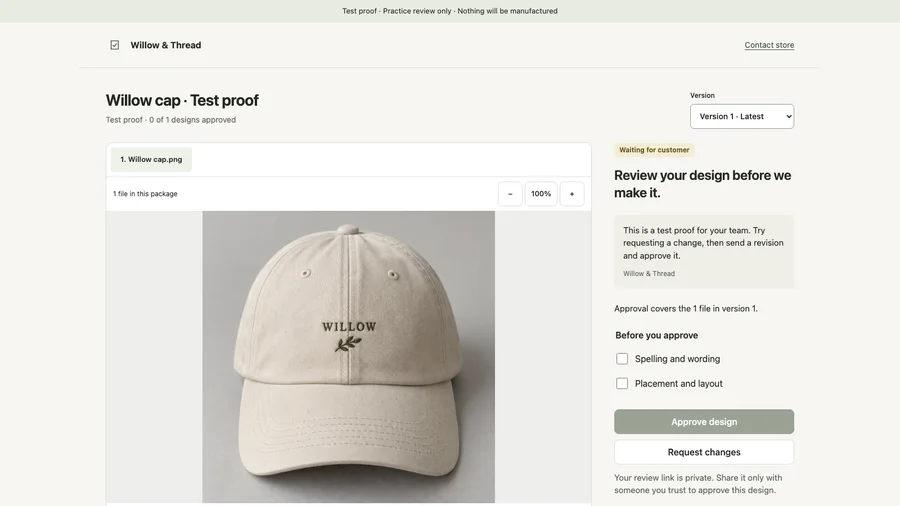
- Upload an image or PDF proof for an individual order item. A private review link gives the customer a place to see the version you sent.
- Keep feedback with the revision
- Customers can approve or request changes from their phone without creating an account. Comments and decisions stay associated with the relevant version.
- See what is ready to make
- Approved items appear in a production queue. Approval of one item does not stand in for approval of every design in the order.
- Take the approved version into production
- Download the approved files with their version-specific approval record. The handoff includes the decision that belongs to those files.
From first step to finished task
Built for custom-product shops, including embroidery, personalized gifts, stickers and wedding stationery. Customer approval records are not legal certification.
- Choose the order item and upload its image or PDF proof.
- Send the private customer link, then review any comments or change requests.
- After approval, download the approved files and their record for production.
Questions before you start
Does the customer need a ProofTable account?
No. Customers review the proof through their private link, including on a phone.
Can I send a new revision?
Yes. Keep each revision and its feedback together so an approval refers to the specific files the customer reviewed.
Does ProofTable edit the design?
No. Prepare the artwork in your usual design software, then use ProofTable to collect review decisions and organize the approved handoff.