
Show Shopify dispatch dates before customers order.
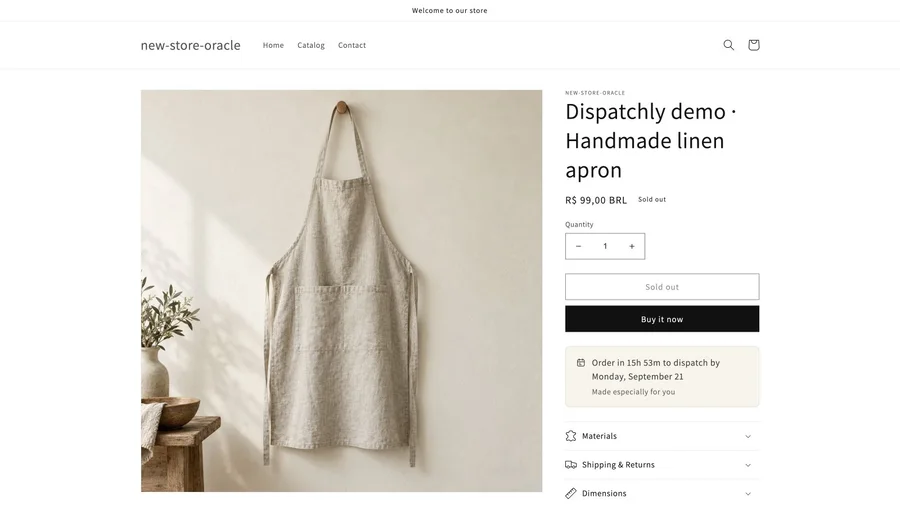
A handmade order takes time before it reaches a courier. Dispatchly puts that production time on your Shopify product page, with a dispatch date and a countdown to your daily cutoff.
Available on Shopify

DispatchlyShopify · Online Store 2.0
What you can do with Dispatchly
- Give each product the time it needs
- Set a default production lead time, then add product or collection rules for items that take longer. Product rules take precedence over collection rules.
- Use your actual working week
- Choose working days, store timezone and a daily order cutoff. All plans support holidays and blackout dates for periods when production stops.
- Make the message fit your theme
- Choose a Minimal, Warm or Compact display. Edit the wording and date format, then add the app block through the Shopify theme editor.
- Keep dispatch and delivery clear
- The date tells shoppers when an order is expected to ship. It does not include courier transit time or promise an arrival date.
From first step to finished task
For handmade, custom, print-on-demand and preorder products. Review the live Shopify listing for current pricing and trial terms.
- Set your usual production lead time, timezone, working days and cutoff.
- Add exceptions for products or collections with a different production schedule.
- Place the Dispatchly block on a product template and check the message on your storefront.
Questions before you start
Does Dispatchly estimate delivery dates?
No. Dispatchly calculates dispatch dates from your production schedule. Carrier transit and the customer's delivery date are separate.
Which Shopify themes work with Dispatchly?
Your store needs an Online Store 2.0 theme that supports product app blocks. The block is added through the theme editor without editing theme code.
Are holidays included in every plan?
Working days, holidays and blackout dates are included in every plan. Check the Shopify listing for current plan details.